


Agency OS AI: All-in-One Open Source AI Project Manager & Client Portal for WordPress

Agency OS AI

Agency OS AI turns WordPress into a central hub where your entire agency can operate without juggling multiple tools. It brings together project management, client handling, support systems, and team collaboration into a single, streamlined workspace designed for real-world agency workflows. From a fully branded client portal to an organized employee workspace, everything is built to keep your operations clear and connected.

Project & Task Management

Branded Client Portal

Help Desk & Support Tickets

AI-Powered Tools

$0.00

Flat
10% Off

Use Code

THEME10

safe

Buyer Protection

1 Year Free Support

14 Days Refund Policy

Real Success, Real Stories
Client Logo Client Logo Client Logo Client Logo Client Logo Client Logo Client Logo Client Logo Client Logo
View all

Quick information

  • Trusted By: 9,000+ customers
  • Last Update: Apr 01, 2026
  • Compatible up to: WP 6.9.x, WC 10.5.x
  • Min PHP version: PHP 7.4 or Higher

Overview

Agency OS AI brings everything your agency needs into a single WordPress plugin. Manage projects and tasks, coordinate your team, communicate with clients through a branded portal, handle support tickets, automate email workflows, and let OpenAI do the heavy lifting, all without leaving WordPress.
Project & Task Management

Project & Task Management

A full project workspace lives inside your WordPress admin. Create projects, task lists, milestones, messages, and file libraries. Track team performance from the reports screen and visualize work across customizable Kanban columns with drag-and-drop support.

Client & Company Management

Client & Company Management

A complete CRM built into the plugin. Manage client profiles, contacts, company details, and link each client to their active projects. Generate invoices with line items, automatic tax calculation, payment tracking, and a PDF-ready format, all from one place.

Branded Client Portal

Branded Client Portal

Deploy a fully branded frontend portal for your clients and employees using a simple shortcode. Clients get rich project visibility cards, a personal Kanban board, a searchable ticket inbox, and milestone previews, all without ever accessing your WordPress backend.

Help Desk & Support Tickets

Help Desk & Support Tickets

A built-in help desk with departments, ticket notes, reusable macros, SLA rules, and AI-assisted routing. New tickets are automatically assigned to the right department, and OpenAI can summarize, prioritize, suggest a first reply, and tag every ticket the moment it arrives.

Built-in SMTP & Webhooks

Built-in SMTP & Webhooks

Configure your outgoing mail server directly from the Settings screen, host, port, authentication, and encryption. Accept inbound emails and auto-create tickets via a secure webhook endpoint. Fire outbound events (ticket.created, task.created, project.created, and more) to any external system with HMAC signature verification.

AI Tools Throughout

AI Tools Throughout

Connect your own OpenAI API key to unlock AI across the entire plugin: an AI playground for direct workspace queries, AI-generated task lists from project descriptions, AI ticket triage in the portal, productivity briefs in reports, and team coach briefs in access management.

Time Tracking

Time Tracking

Know exactly where your team's hours are going. Start a live timer, tag it to a project, and mark it billable before you even write the first line of code. Entries log automatically, billable hours separate from non billable ones, and everything rolls up into clean reports ready for your next invoice run.
Open Source & GPL 2.0

Open Source & GPL 2.0

Licensed Agency OS AI is released under the GPL 2.0 license, the same license that powers WordPress itself. You own your data, your installation, and your workflow. Fork it, extend it, or build your own add ons on top of it. No vendor lock in, no forced upgrades, no subscription required to keep running what you already have.

Features

Feature 01

Dashboard : See Everything That Matters the Moment You Log In

A modern, fast React-powered admin workspace lives inside your WordPress dashboard. Navigate between Projects, Clients, Invoices, Time Tracking, Milestones, Messages, Files, AI Assistant, Reports, Team, and Settings, all from a clean sidebar. The branded header shows your agency logo and gives every team member instant access to Quick AI from any screen.
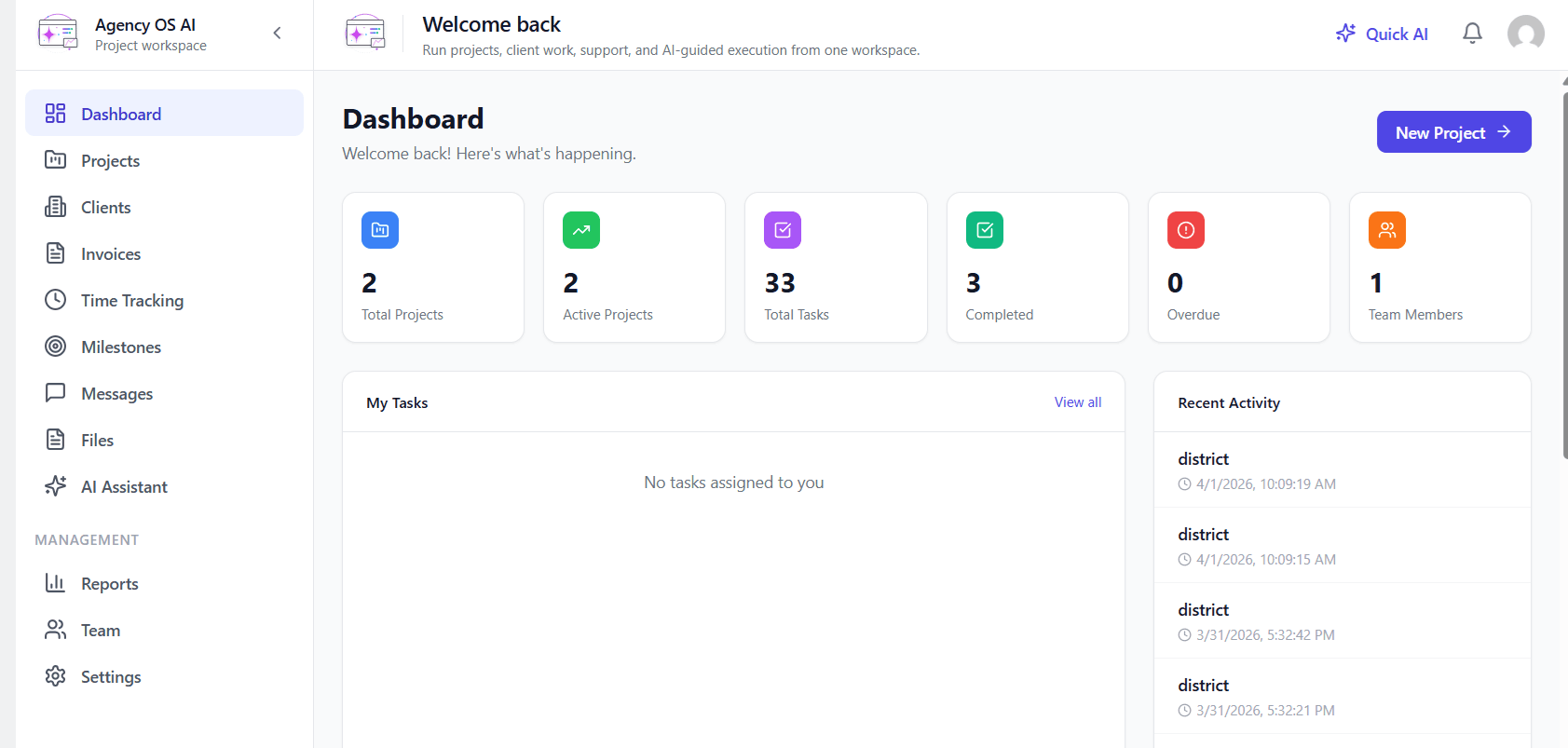
Dashboard : See Everything That Matters the Moment You Log In
Feature 02

Projects : Plan, Assign, and Move Work Forward with an AI-Powered Project Board

Every project gets a visual Kanban board with fully customizable columns. Drag tasks between Backlog, To Do, In Progress, In Review, and any custom stage you define. The AI Generate Tasks button creates a complete task list from a plain-language project description, so your team hits the ground running from day one.
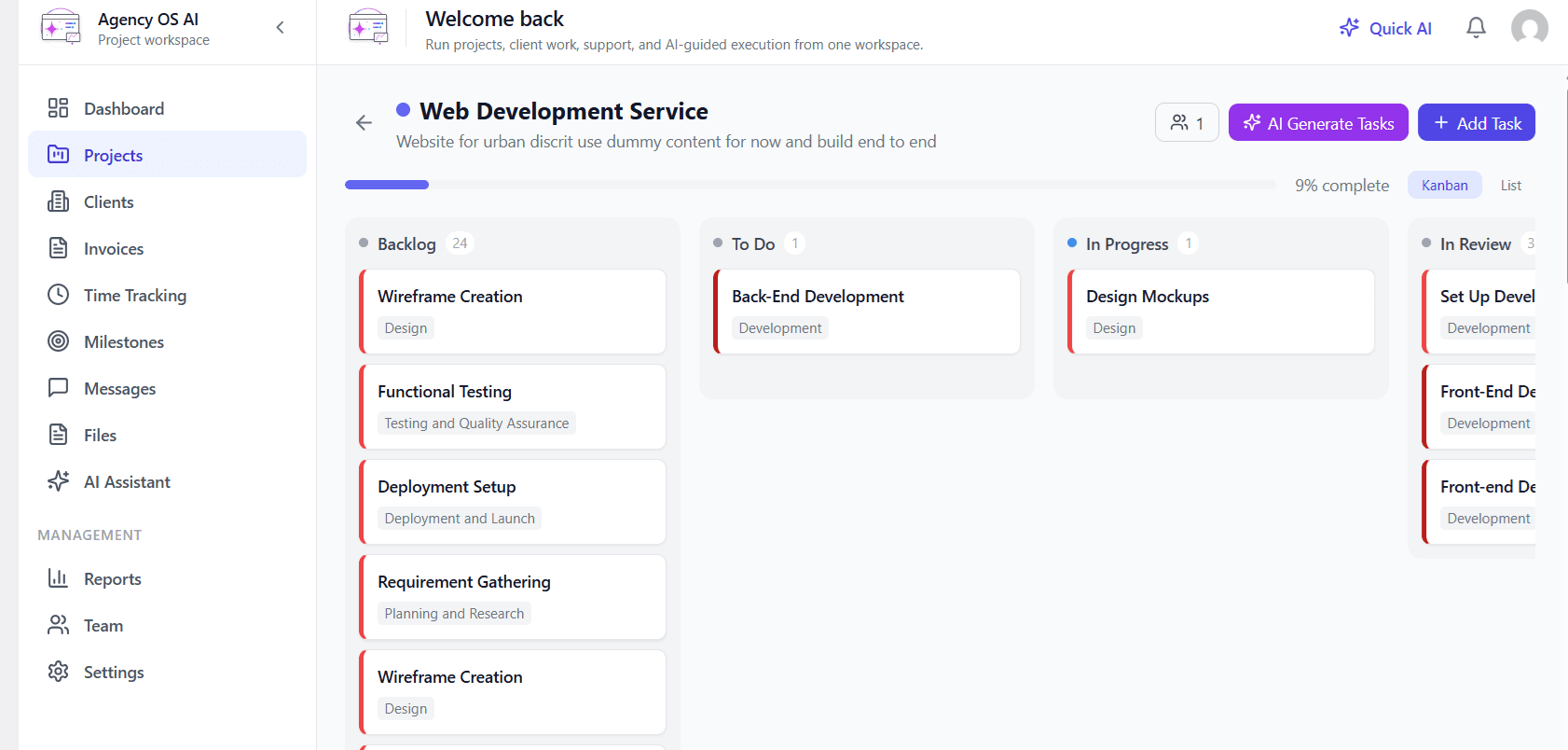
Projects : Plan, Assign, and Move Work Forward with an AI-Powered Project Board
Feature 03

Invoices : Create Client Invoices in Minutes, No Spreadsheets, No Third-Party Tools

Create professional client invoices without leaving WordPress. Select a client, set an issue date, due date, and tax rate. Add unlimited line items with description, quantity, and rate, subtotal, tax, and total all calculate automatically. Attach payment notes and generate the invoice in one click.
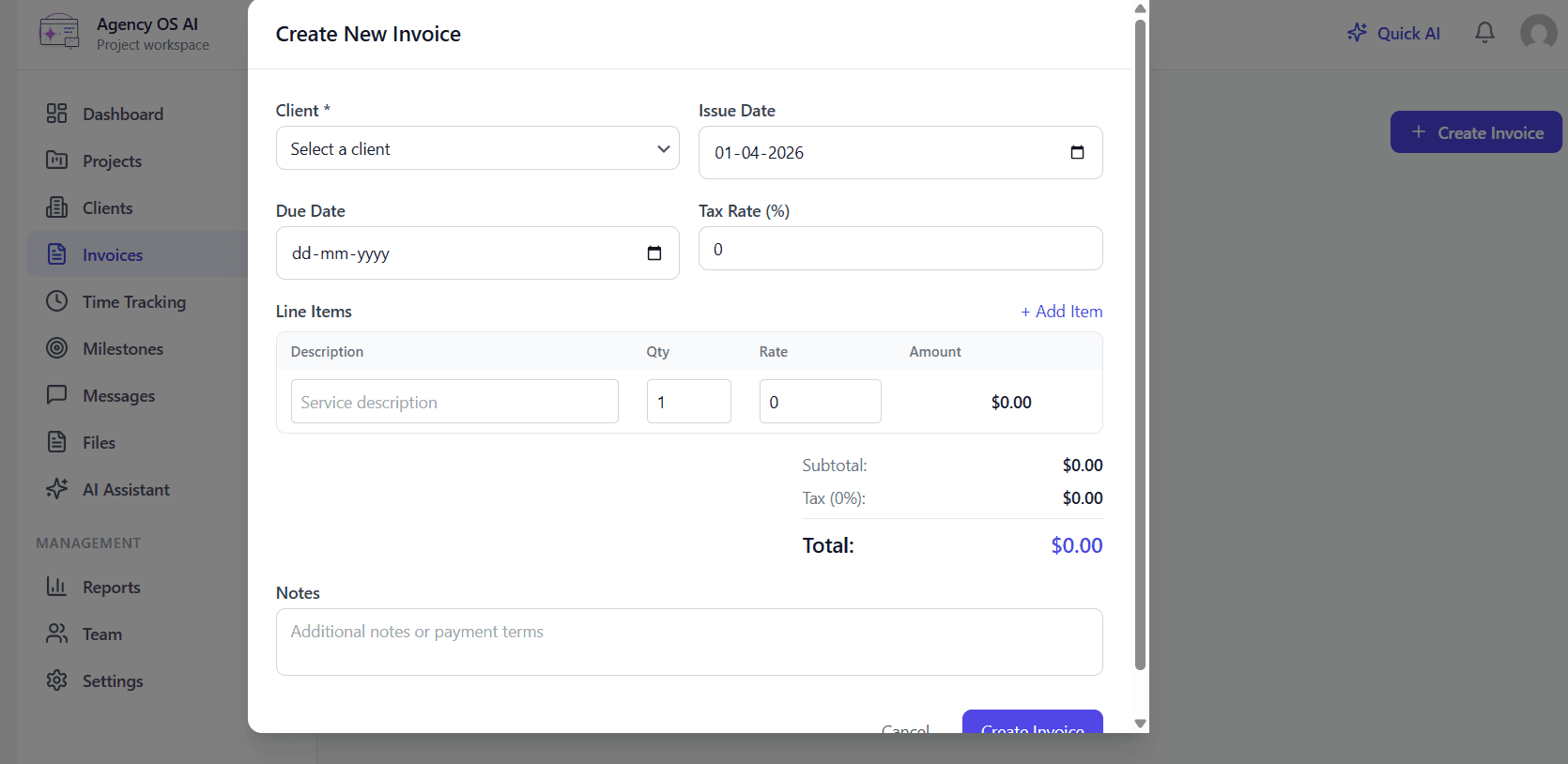
Invoices : Create Client Invoices in Minutes, No Spreadsheets, No Third-Party Tools
Feature 04

Time Tracking : Track Every Billable Hour Without Leaving Your Workspace

Start, stop, or pause a live timer directly from the Time Tracking screen. Select a project, describe what you are working on, check Billable, and hit start. Total Hours, Billable Hours, and Entries Today update in real time. Filter by date range and project for clean, accurate reporting that feeds directly into your invoicing workflow.
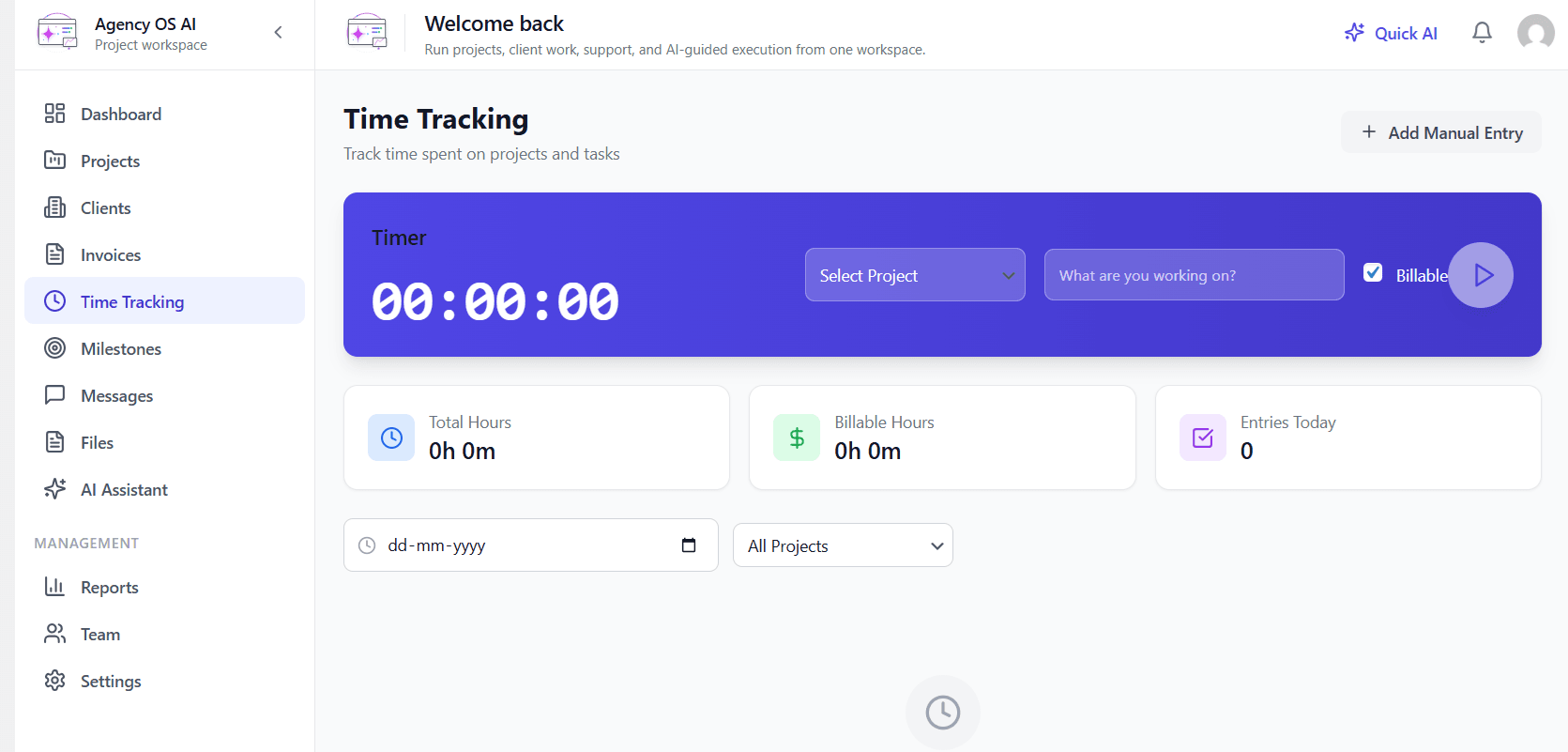
Time Tracking : Track Every Billable Hour Without Leaving Your Workspace
Feature 05

AI Assistant : Get Instant AI Help on Any Screen, Without Stopping What You Are Doing

The AI Playground gives your team a dedicated space to generate ideas, summarize work, and draft client-ready content. The Quick AI sidebar is available from every screen in the workspace, ask it to summarize high-priority work, turn a project update into a client-ready note, suggest next actions for a delayed project, or triage blockers across active tickets and tasks.
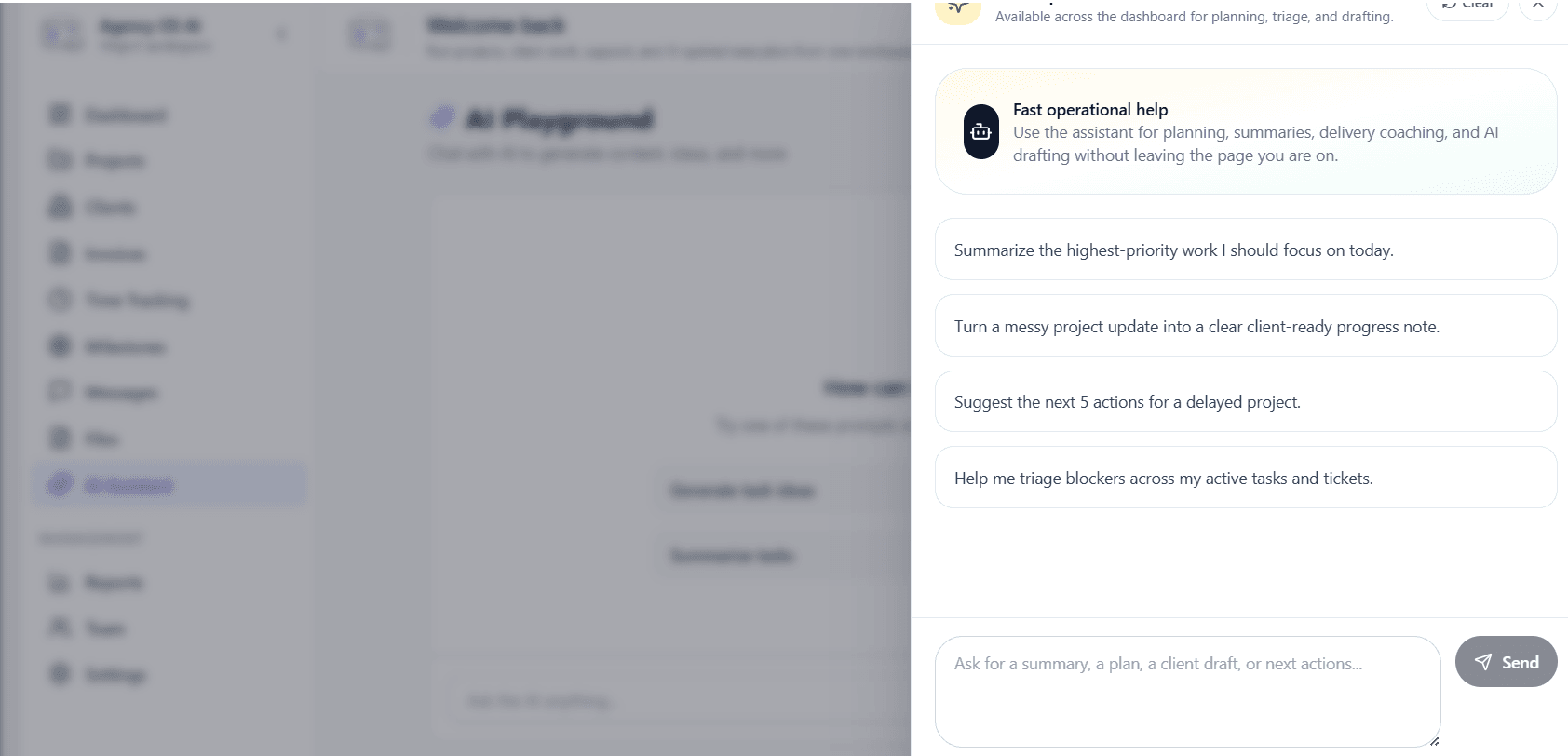
AI Assistant : Get Instant AI Help on Any Screen, Without Stopping What You Are Doing
Feature 06

Reports : Turn Your Project Data Into a Real Action Plan with One Click

Get a real-time picture of your workspace with six key metrics. Then click Generate Brief, OpenAI reads your current data and writes a concrete action plan for team delivery focus, project momentum, and operational risk recovery. Charts for Tasks by Status and Tasks by Priority give instant visual clarity across all active work.
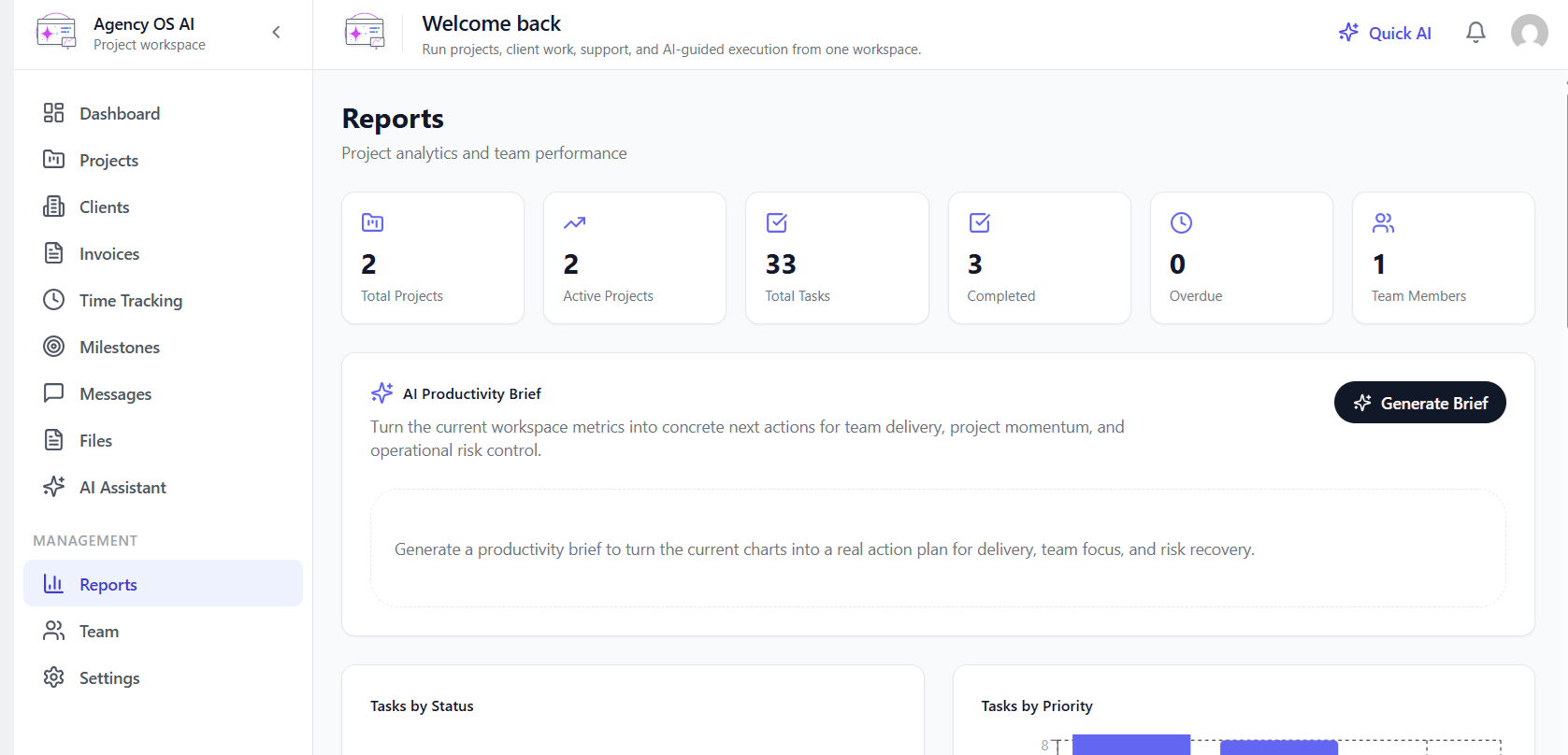
Reports : Turn Your Project Data Into a Real Action Plan with One Click
Feature 07

Settings : Brand Your Entire Agency Workspace and Go Live in One Click

One Settings screen covers everything your agency needs to configure. Set your company name, logo, brand colors, and portal welcome copy under Company. Configure the client portal behavior under Portal. Add your OpenAI API key under AI. Manage access controls and login auditing under Access. Set up built-in SMTP email delivery under Email. Configure inbound and outbound webhooks under Automation. Use One-Click Page Creation to deploy your login, portal, and support pages instantly.
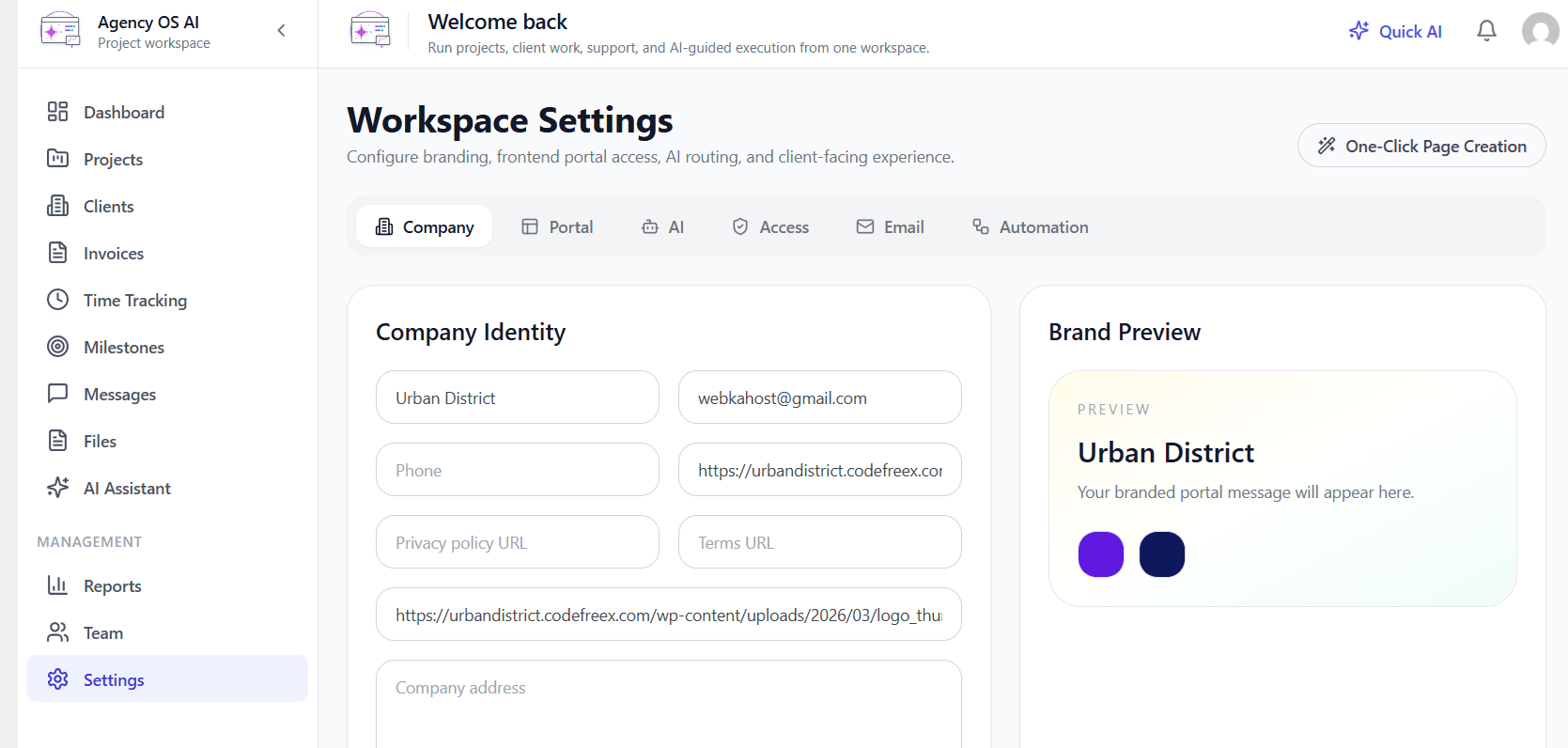

Settings : Brand Your Entire Agency Workspace and Go Live in One Click

Plugin Compatible With Us

Request Compatibility
WordPress
WordPress
Affiliate Manager
Affiliate Manager
Woo Subscription
Woo Subscription
WooCommerce Membership
WordPress Multisite
WordPress Multisite
Advanced Custom Fields
Coupon Referral Program

Pricing Plans

Free

Get Started Free

  • Projects & Task Management
  • Client & CRM
  • Invoicing & Billing
  • Time Tracking
  • Branded Client Portal
  • Help Desk & Support Tickets
  • Email & Automation
  • AI Tools
  • Reports & Analytics
  • Settings & Configuration
Pro

Go Pro

  • Comming Soon.
Get Instant Access
Add to Cart & Get Instant Access

✓ Instant Download✓ 14-Day Refund✓ 1 Year Support✓ Secure Payment

FAQs

No. Agency OS AI is a standalone WordPress plugin. It comes with everything built in, project management, client CRM, invoicing, time tracking, a branded client portal, help desk, built-in SMTP email, and webhook automation. No third-party dependencies required.
It works for both. If you manage even one client project, you can use Agency OS AI to track tasks, log billable hours, send invoices, and give your client a branded portal to check progress without paying for a single SaaS subscription.
Your client visits the login page on your WordPress site, signs in with their credentials, and lands directly inside their branded portal. They can view their projects, track milestones, submit and follow up on support tickets, and communicate with your team without ever seeing your WordPress admin.
No. Every core feature including projects, tasks, CRM, invoicing, time tracking, tickets, SMTP, and webhooks works without an AI key. The OpenAI key is only needed if you want to activate AI features like AI Generate Tasks, the Quick AI sidebar, the AI Productivity Brief in Reports, and AI ticket triage in the portal.
Yes. Agency OS AI includes a built-in SMTP configuration under Settings. Set your mail host, port, authentication, and encryption once, and all notifications including ticket updates, project messages, and invoice emails go out from your own domain with your own branded sender name and footer.
You can connect your support email to the inbound webhook endpoint that Agency OS AI provides. When a client sends an email it is automatically converted into a support ticket, routed to the correct department, and assigned to the right team member without anyone manually creating a ticket.
Yes. The Dynamic Workflow Stages feature lets you create your own Kanban columns for both tasks and tickets. You can rename, reorder, and color code every stage to match exactly how your agency delivers work. Changes take effect immediately across the admin workspace and the client portal.
No. The free core places no artificial limits on the number of projects, clients, invoices, tasks, tickets, or team members. You can run your entire agency operation on one install with no paywalls on the core workflows.

Related Products